Automated CBM decisions
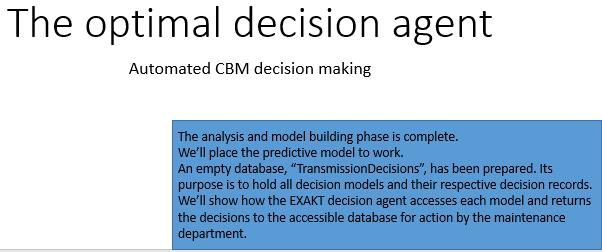
It has been said that unless CBM can be automated, its usefulness is minimal. That is because there just aren’t enough human resources in a maintenance department to eyeball data as it arrives and decide on a reasonable preventive action. As data proliferates driven by ever growing technology the gap will widen further. Clearly, a model based CBM policy that is both automated and verifiable as actually meeting the organization’s objective is needed.
Attaching the DMDR database
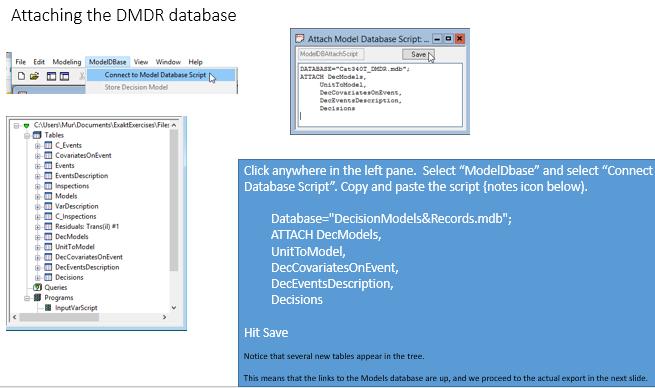
The analysis and model building phase is complete. We are now ready to export the optimal decision model we created into our maintenance system environment (where it has access to continuously renewing data), and, where it can do its job. An empty database has been prepared. Its purpose is to hold all EXAKT decision models and their respective future decision records. In the next slides, we’ll see how the EXAKT decision agent accesses each model and returns the decisions to the database where they may be accessed by the EAM. Copy and paste the attachment script:
Database="Cat340T_DMDR.mdb";
ATTACH DecModels,
UnitToModel,
DecCovariatesOnEvent,
DecEventsDescription,
Decisions
Exporting the model
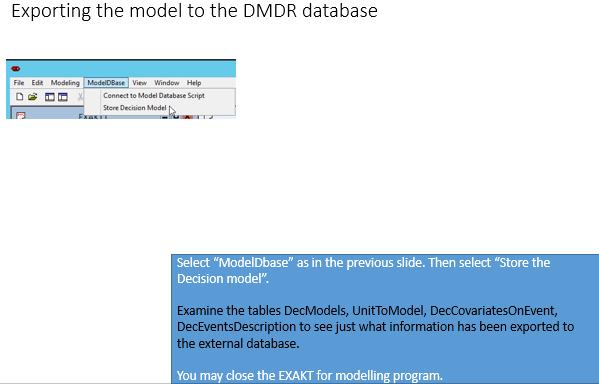
Once the DMDR database is attached to the WMOD database we have the ability to read and write to the tables from EXAKTm. By hitting “Store Decision Model” we copy the current “il” model to a the DMDR database which will hold all the models we create as well as a perpetual record of all decisions made by applying the model.
EXAKT for decisions
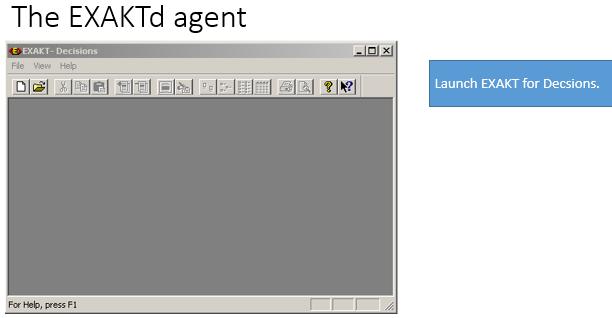
The EXAKTd decision agent operates independently from EXAKTm. You may set it up to run automatically in a Windows scheduled task, or in response to system commands with parameters from other programs. Or, it can be run from its own user friendly interface as described in the following slides. In this section we run the “agent” manually. (It can also be set up to run automatically). After you execute the following steps the user interface of the EXAKTd decision agent appears.
Create a working database for the EXAKTd agent
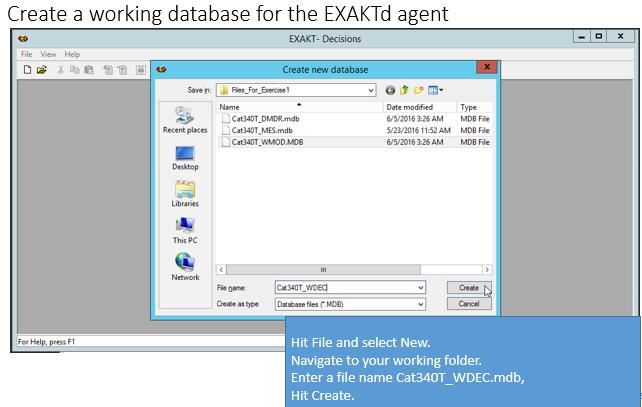
In the model building session EXAKT for modeling used a WMOD (working model) as a platform on which to build, test, and improve the model. Similarly EXAKT for decisions will use a WDEC (working decision) database to manage the models associated with an asset.
Connect to the DMDR database
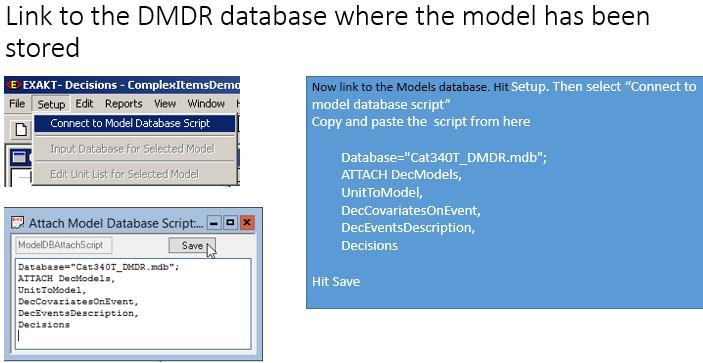
Now we will link to the database where we previously exported our model (Slide 22 of Section I.). After executing these steps you will see the name of the Model you created, “Trans” in the top left pane. The identical script to that used in connecting from WMOD is used again from WDEC.
Database="Cat340T_DMDR.mdb";
ATTACH DecModels,
UnitToModel,
DecCovariatesOnEvent,
DecEventsDescription,
Decisions
Expand the Trans model in the tree
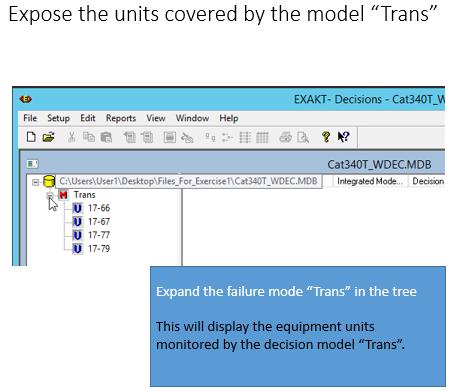
EXAKTd instantly displays all the models and the equipment units monitored by each model. The unit-to-model relationship is maintained in the UnitToModel table of the DMDR database. Additional units may be added easily in the EXAKTd program. Additional models may be added from EXAKTm and the WMOD database. There can be as many models as required. In this exercise we created only a single model “Trans” for the CAT 240T Truck class. But we can go back to WMOD and add as many models as there are failure modes whose consequences can be mitigated by CBM.
Run the model on all units
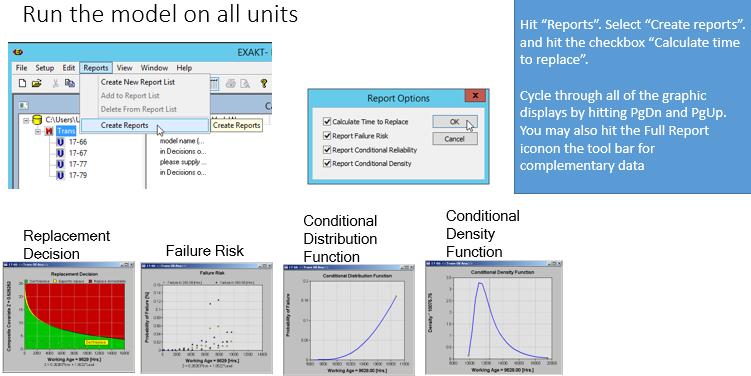
It is important to note that the EXAKTd program does not need to be used directly by a user. EXAKTd can be scheduled to run automatically on some or all the models and their respective equipment units. The results are written to the Decisions table in DMDR which can be accessed by any reporting program or dashboard.
Exception Summary report
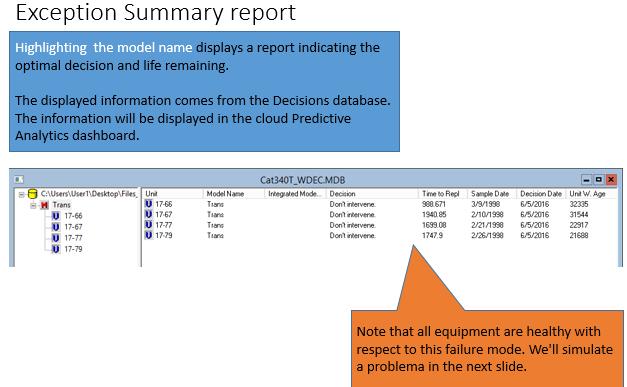
By highlighting the model “Trans” the decision table is displayed. It is easy to see that the table can easily be displayed as an exception report by department or manager where only equipment with a low RULE (remaining useful life estimate) are reported. In this example all units are healthy. What would the report look like if one unit were in a potential failure state?
Simulate a problem
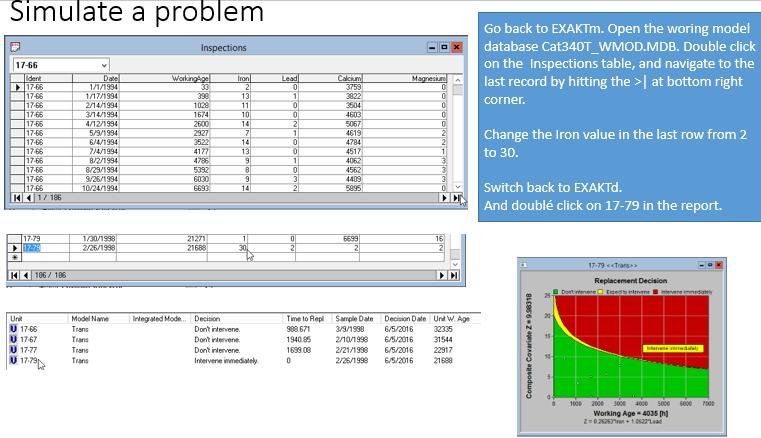
Suppose Iron in unit 17-79 increased rapidly to the extent that the model determined that the equipment was in a potentially failed state and it required immediate attention. We can easily simulate this situation by accessing the Inspections table in EXAKTm as shown.
## Post Tree Navigation
LRCM
- CMMS Impediments to Reliability Analysis
- Components of continuous improvement
- How to start LRCM
- Justifying Living RCM Certified
- Leading and lagging performance numbers
- Living RCM Certified – Consulting Services
- LRCM – Reporting failure modes of rotable components
- LRCM and HSE
- LRCM Justification Template
- LRCM reliability analyst survey results
- LRCM reliability technician survey results
- MESH – RCM knowledge continuous improvement
- Motivation, leadership, training
- PAS-55
- RCM – Dashboards
- Reliability engineer’s work cycle
- Service vs. maintenance
- Streamlined RCM and LRCM
- Structured free text
- The role of media in living RCM
- The winning paper at the XIV International Congress of Maintenance
- Two philosophies in maintenance improvement
- Waiting for CMMS maturity
- What is a pilot project?
- What is the difference between RCM and LRCM?
- Achieving Reliability from Data outline with video
- Course brochure – Living RCM Certified
- Deepwater Horizon
- Elevator description of LRCM
- How does LRCM “improve” RCM?
- Living RCM Certified
- Living RCM Certified eLearning
- Living RCM Certified® and ISO 14224
- LRCM – off the maintenance improvement radar
- LRCM-EXAKT – a general solution
- MESH Basic reliability analysis on the work order
- Mesh Living RCM Certified brochure – Mesh Cloud Service
- Obtener confiabilidad a partir de los datos – esquema del curso
- RCM – Analyst course outline
- RCM – feedback suggestion mechanism
- RCM – Living RCM
- RCM – LRCM dashboards
- RCM – feedback – suggesting a new failure mode
- Training course in achieving reliability from data
- Two kinds of decision making in maintenance
- Two LRCM purposes
- Videos
- Why Living RCM works
RCM
Reliability Analysis
- Achieving Reliability from Data
- Challenges to Achieving Reliability from Data
- Data analysis precedes reliability analysis
- Data is the key to the way forward
- Defeating CBM
- Does historical age data have value?
- Failure declaration standards
- Free text on the work order
- How much data is required for RA?
- How to assess EAM and CBM predictive capability
- Interpreting failure data
- LRCM – Reporting failure modes of rotable components
- Maintenance software
- Mesh: 12 steps to achieving reliability from data
- RA requires LRCM
- Reliability analysis in 2 dimensions-Part 2
- Sample selection
- So you’re getting an EAM
- Take the EAM data health check
- The CMMS barrier to RCM
- The data barrier to analysis
- The reliability data Catch 22
- Thoughts from a mine maintenance engineer
- Variations in a sample
- Warranty for haul trucks
- Weibull exercises
- What’s the right data?
- A survey of signal processing and decision technologies for CBM
- Achieving reliability from data
- CBM Defined
- Conditional failure probability, reliability, and failure rate
- Conditional probability of failure
- Conditional probability of failure vs. hazard rate
- Criticality analysis in RCM
- Diagnostics versus prognostics
- Difference between LRCM and EXAKT
- EXAKT’s Three Modules
- Expected failure time for an item whose maintenance policy is time-based
- Failure analysis for reliability analysis
- Failure probability prior to attaining MTTF
- FAQ
- FMEA according to Wikipedia
- Is “random failure” really random?
- Leading and lagging performance numbers
- LRCM and the Failure Finding Interval
- MTTF is the area under the reliability curve
- Myths about RCM in heavy mining equipment
- Non-rejuvenating events
- Optimal PM and spares strategies – exercises
- Performance metrics – Low and High level KPIs
- Problem statement
- Purpose of RA
- RA – Micro (day-to-day decision) analysis
- Random failure and the MTTF
- Random failure is exponential reliability decay
- RCM – Living RCM: Achieving reliability from data
- RCM vs RA
- Real meaning of the six RCM curves
- Reliability analysis is counting
- Reliability trend yes Weibull analysis no
- Remaining Useful Life Estimation Using Hybrid Monte-Carlo Simulation and Proportional Hazard Model
- Safety Instrumented Systems
- TBM or CBM?
- Terminology in LRCM
- Thinking RCM
- Time to failure
- What is PM?
- What is the scale parameter?
CBM
- A survey of signal processing and decision technologies for CBM
- Automating CBM
- Building a CBM decision model
- CBM Exercises
- CBM Optimization
- Combined analysis for early predictive maintenance
- Deploying the CBM model
- EXAKT cost sensitivity analysis
- EXAKT needs LRCM
- EXAKT vs Weibull
- Measuring and Improving CBM Effectiveness
- Optimizing a Condition Based Maintenance Program with Gearbox Tooth Failure
- RCM – Reliability analysis in more than two dimensions is CBM
- Smart CBM demo
- What is Maintenance Decision Automation?
- Confidence in predictive maintenance
- Diagnostics versus prognostics
- Inspections – CBM and others
- Inspections or CBM?
- Internal and external CBM variables
- NAVAIR and the PF interval
- Objectivity in condition based maintenance decisions
- Optimized interpretation of CBM data
- P-F Interval a red herring?
- PF interval from the failure rate
- PM, PdM, Proactive Maintenance
- Predictive analytics
- Temporary fix work orders
- The elusive P-F interval
Leave a Reply
You must be logged in to post a comment.