The RCM review meeting is only one of many input mechanisms to a comprehensive, defensible, and dynamic maintenance plan. Between meetings or after the initial RCM project is over how can we continue to capture and document experience and insight from our SMEs in the field?
Here is a procedure that SMEs (technicians, analysts, and engineers) might use if they think of new ideas or refinements between meetings or in the course of their daily work order related activities.
- Log in to Mesh
- Hit DAS
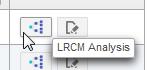
- On the work order (Code) line, hit the LRCM icon
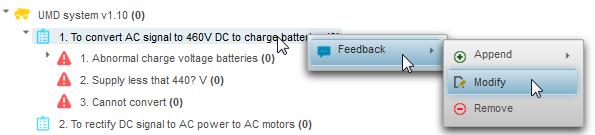
- Right click on the RCM element you would like to modify and hit “Feedback” | “Modify”
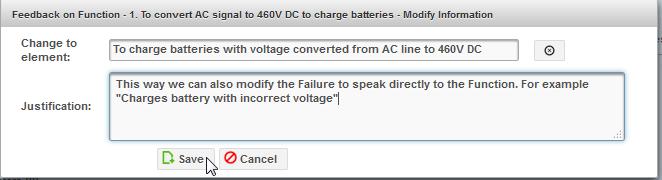
- Edit the text with your suggestion and add a justification for the proposed change.
-
- Hit the “Pending Feedbacks” tab if you want to review your suggestions. You can delete it by hitting the garbage can icon.


During group meetings the SMEs, facilitator, and analyst review suggestions, edit them, and update the RCM knowledge base.
If you liked this article you may also enjoy
- What is a pilot project? (100%)
- Measuring and Improving CBM Effectiveness (100%)
- MESH – RCM knowledge continuous improvement (100%)
- MESH Basic reliability analysis on the work order (100%)
- RCM – feedback – suggesting a new failure mode (100%)
- Mesh: 12 steps to achieving reliability from data (RANDOM – 100%)
Leave a Reply
You must be logged in to post a comment.