In the post “RCM – feedback suggestion mechanism” we described the steps for feeding back (and later accepting) a suggestion to modify the text of an RCM node, for example, a system, subsystem, component, function or failure. In this article we’ll extend the method to suggest and then add a new failure mode to an RCM knowledge base.
- Log in to Mesh
- Hit DAS
- On the appropriate work order (Code) line, hit the LRCM icon
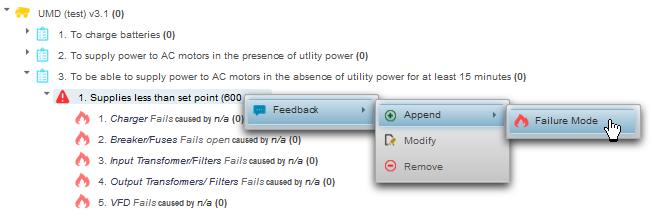
- Right click on the RCM failure element below which you would like to add a failure mode hit “Feedback” | “Append” | “Failure Mode”
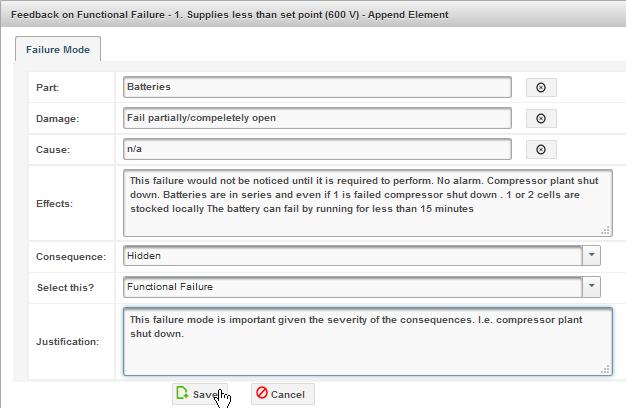
- Enter your suggested Failure Mode, its Effects, Consequences, and the Event Type (for the current work order). Also provide a justification for adding this failure mode to the RCM knowledge base. Hit save.
- Hit the “Pending Feedbacks” tab if you want to review your suggestions. You can delete it by hitting the garbage can icon (not shown) on the far right.
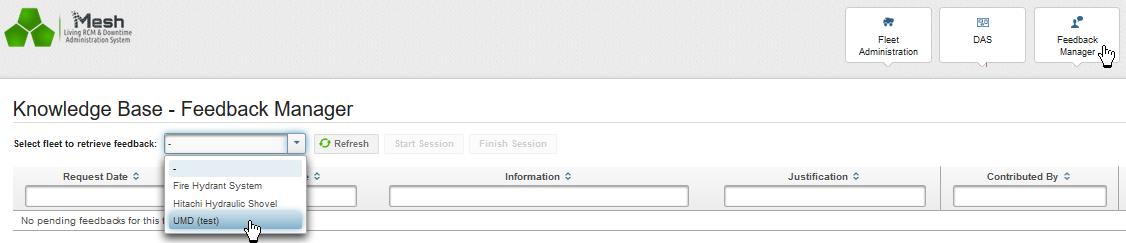
- If you are the facilitator or reliability engineer responsible for the asset or fleet RCM knowledge base in question, you may process this feedback by hitting the “Feedback Manager” tab. Then select the fleet, asset, or equipment type.
- Select “Start Session”. Then select the “Process Feedback” icon.
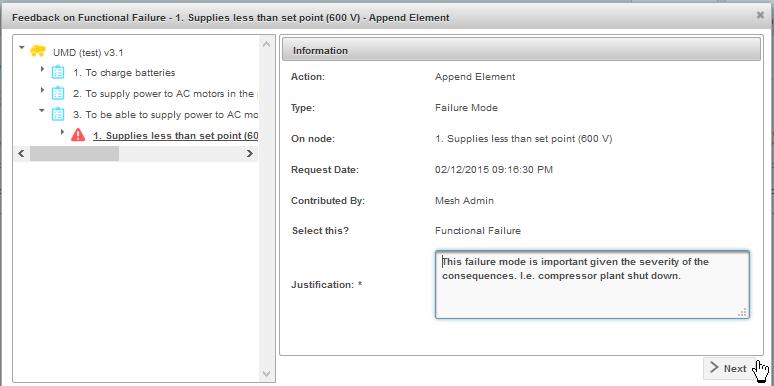
- In the Dialog tree view note the location of the node to be appended. Examine the justification, and hit “Next”.
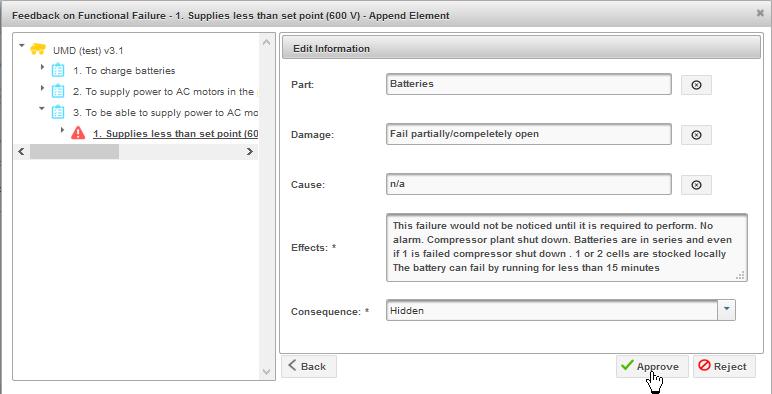
- In the second dialog edit the information if appropriate and hit “Approve”.
- The feedback suggestion has now been accepted and the RCM knowledge has been updated accordingly.[1] The current work order has also been updated with the instance of the new failure mode and the Event type “Functional Failure” designated by the technician. You may now, if required, go directly to the new node in the knowledge base and add appropriate information, including the mitigating task.




- [1]It should be pointed out that the record of this and all changes to the knowledge base are recorded by Mesh and can be reviewed retroactively using the “View Audit Trail” icon located on each row in the Fleet Administration tab. See “MESH use cases – Knowledge trail“↩
If you liked this article you may also enjoy
- What is a pilot project? (100%)
- Measuring and Improving CBM Effectiveness (100%)
- MESH – RCM knowledge continuous improvement (100%)
- MESH Basic reliability analysis on the work order (100%)
- RCM – feedback suggestion mechanism (100%)
- RA requires LRCM (RANDOM – 35.3%)
Leave a Reply
You must be logged in to post a comment.